1. Purpose
This help file explains how to calculate and update the gratuity amount during the Full and Final (F&F) settlement process in StaffingGo.
2. Prerequisites
Before processing gratuity, ensure the following details are available:
The employee's Date of Joining (DOJ) and Date of Leaving (DOL).
The employee's status is Resigned.
The employee is included in the F&F process.
The employee's last salary structure contains the applicable Basic Salary and DA components.
3. Steps to Calculate Gratuity
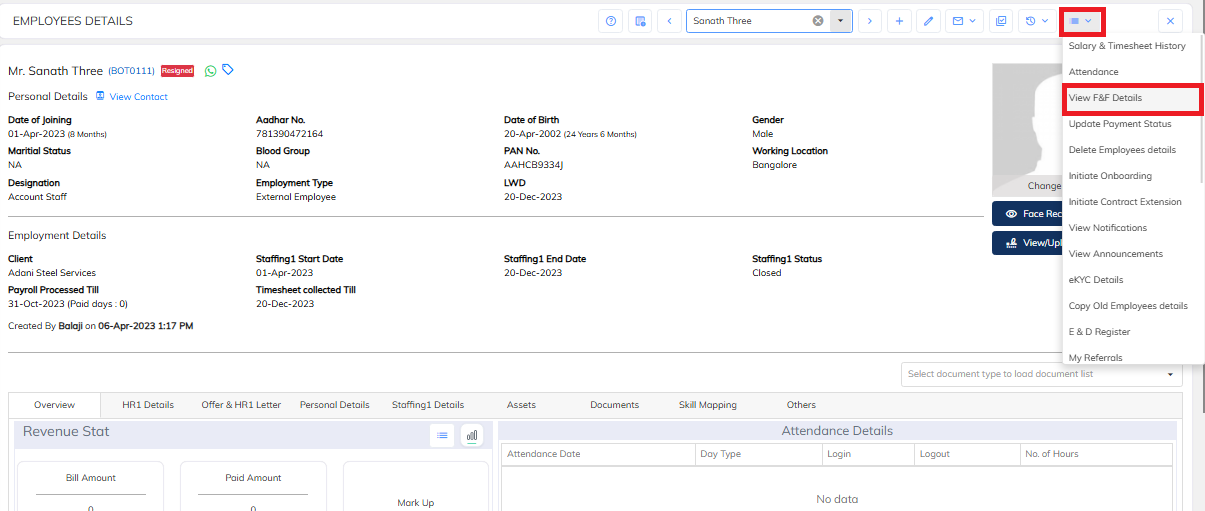
Step 1: Open F&F Details
Navigate to the employee details in StaffingGo.
Click View F&F Details.
Locate the Gratuity section.
Step 2: Verify Employee Details
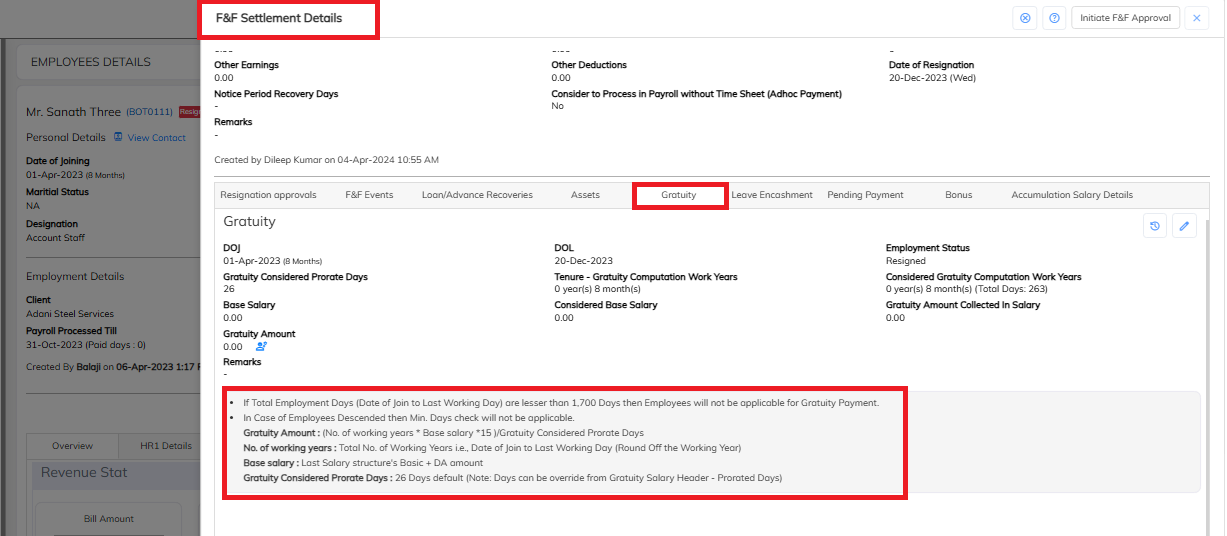
Verify the Date of Joining (DOJ) and Date of Leaving (DOL).
Confirm that the employee's status is Resigned.
Review the total employment period and working years.
Check the prorated days applicable for the gratuity calculation.
Note: Employees with total employment of fewer than 1,700 days are generally not eligible for gratuity under this system's configured rule. However, this minimum-days check does not apply in cases of employee death.
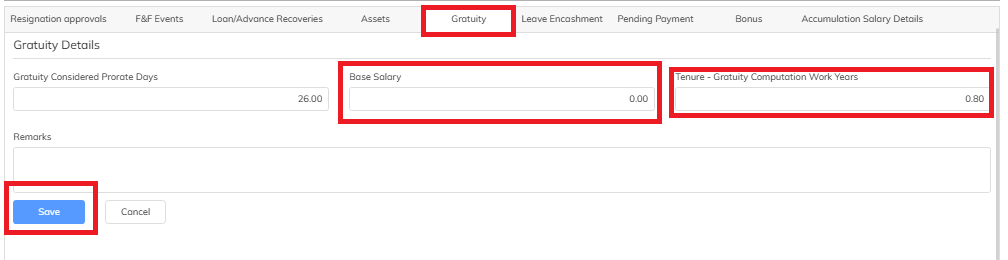
Step 3: Edit the Gratuity Details
Click the Edit button in the Gratuity section.
Enter or verify the applicable Basic Salary and DA amount based on the employee's last salary structure.
Review the working years and gratuity prorated days.
Verify the details before proceeding with the calculation.
Step 4: Calculate the Gratuity Amount
The gratuity amount is calculated using the following formula:
Gratuity Amount = (No. of Working Years × Base Salary × 15) / Gratuity Considered Prorate Days
Where:
No. of Working Years: Total employment tenure from DOJ to DOL, with the working years rounded off as per the configured calculation.
Base Salary: Basic Salary + DA from the employee's last salary structure.
Gratuity Considered Prorate Days: 26 days by default. This can be overridden in the Gratuity Salary Header under Prorated Days.
Example:
If the working years are 5, the base salary is ₹20,000, and the prorated days are 26:
Gratuity Amount = (5 × ₹20,000 × 15) / 26
Gratuity Amount = ₹57,692.31
This example is for illustration only. The actual amount depends on the employee's details and the system configuration.
Step 5: Save the Gratuity Details
Verify the calculated gratuity amount.
Click Save to save the details.
Recheck the saved amount in the Gratuity section of the F&F details.
Downloading Gratuity Reports
StaffingGo provides reports to review gratuity provisions and employee exit details.
4. Important Notes
Employees with fewer than 1,700 total employment days are not eligible for gratuity under the configured system rule, except in cases of employee death.
The Base Salary must be taken from the employee's last salary structure and must include Basic Salary + DA.
The default gratuity prorate value is 26 days.
To change the prorate days, update the Prorated Days value in the Gratuity Salary Header.
Verify all employee details and salary components before saving the gratuity calculation.
5. Conclusion
Following the above steps helps users enter, verify, and save gratuity details during the F&F settlement process in StaffingGo.
Was this article helpful?
That’s Great!
Thank you for your feedback
Sorry! We couldn't be helpful
Thank you for your feedback
Feedback sent
We appreciate your effort and will try to fix the article