Reason for the "Invoice from State / Cost Center – GST Billing State Not Updated" Error
- The error occurs when the Billing Details have not been updated.

Solution:
Based on the invoice generation method, verify the billing basis. If the invoice is generated Client-wise or Branch-wise, ensure that the Billing Details are updated for the respective Client or Branch.
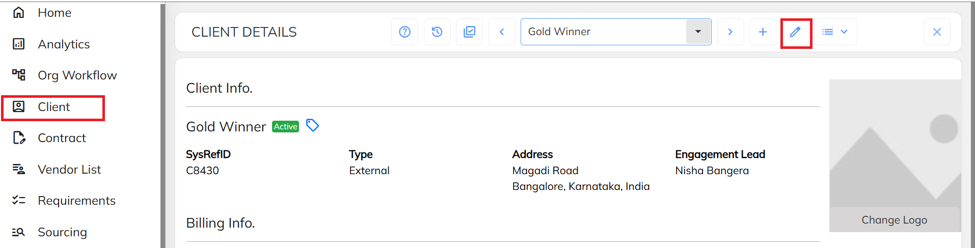
- Navigate to the Client section, select the required Client, and click the Edit icon.
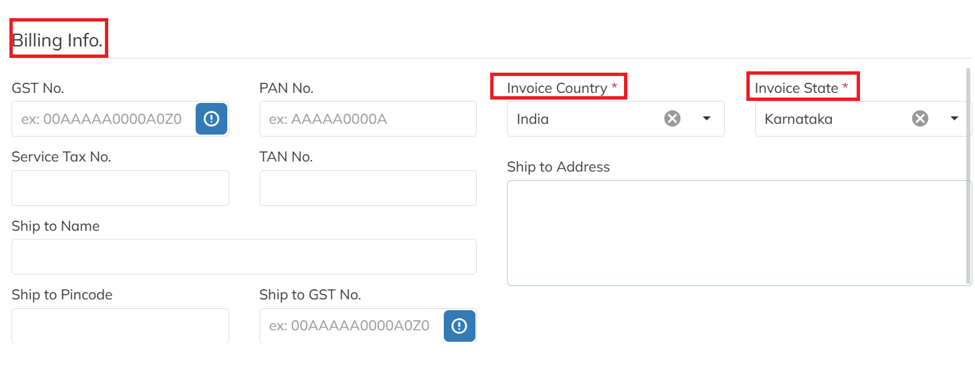
- Under Billing Info, update the required billing details and save the changes.
Was this article helpful?
That’s Great!
Thank you for your feedback
Sorry! We couldn't be helpful
Thank you for your feedback
Feedback sent
We appreciate your effort and will try to fix the article