In the StaffingGo application we do have invoice and e-invoice functionality for the multiple GST Type category. Follow the below mentioned GST type and functionality
Below mentioned GST Functionality configuration available both client level & Branch Level configuration
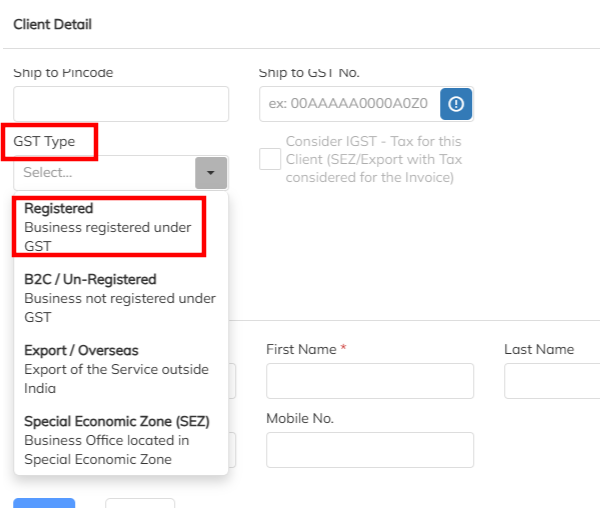
1. Registered/ B2B
2. Export / Overseas
3. Un-registered / B2C
4. Special Economic Zone (SEZ)
1. Registered GST Type:
- Client should be mandatory to map GST No.
- Based on client level configured invoice from state (cost center) to invoice to state tax type will auto update ( IGST/ CSGT& SGST) .[IGST → If states differ CGST & SGST → If both states are same]
- During the invoice process tax amount is greater than zero.
- Invoice will post to e-Invoice portal as B2B invoice.
2. Export / Overseas
- Invoice will falls under export category need to flag the selected client GST type as Export/Overseas.
- Client should not be mandatory to GST No updating
- In export invoice we have two category invoice process. 1. Export with SEZ & 2. Export with IGST.
A. Export with SEZ: Once GST type tagged with Export default application will consider the tax type as SEZ with zero tax amount and invoice will post as SEZWOP.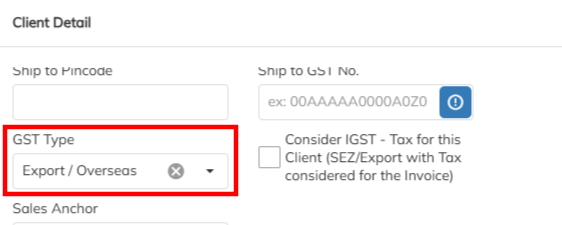
B. Export with IGST : Once the GST type tagged with Export, need to enable the IGST configuration consideration. For this case Export invoice will generate with IGST tax with tax amount. Same invoice will post SEZWP to e-invoice portal.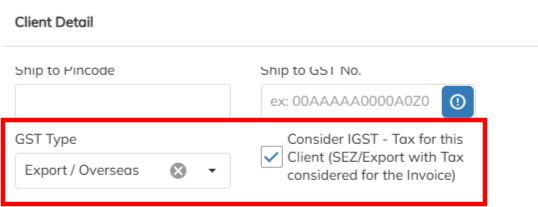
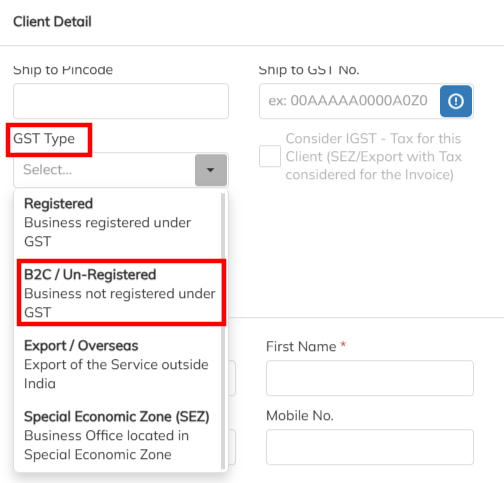
3. Un-registered / B2C
- Clients are not registered with GST No for those cases invoice can raise to client . In this GST Type should enable with Un-registered and No need of the GST no updating in the application. Unregistered invoice will have zero tax amount.
- Unregistered invoice are posted to e-Invoice as B2C
4.Special Economic Zone (SEZ)
- Client should be mandatory to update with GST No.
- In SEZ invoice we have two category invoice process.1. SEZ & 2. SEZ with IGST consideration.
A. SEZ -If the client falls under SEZ need to flag the GST type as Special Economic Zone (SEZ) under client level GST type tagging. In invoice default will consider as SEZ with zero tax and e-invoice will be posted as SEZWOP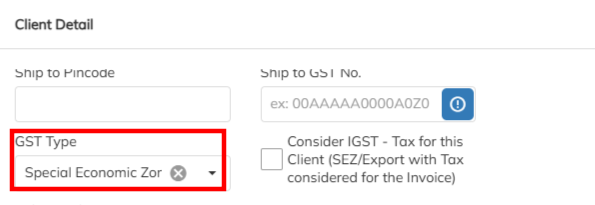
B. SEZ with IGST - If the client falls under SEZ with IGST need to flag the GST type as Special Economic Zone (SEZ) under client level GST type along with enabling the IGST consideration option. In invoice will consider as IGST with tax amount. E-Invoice will post as SEZWP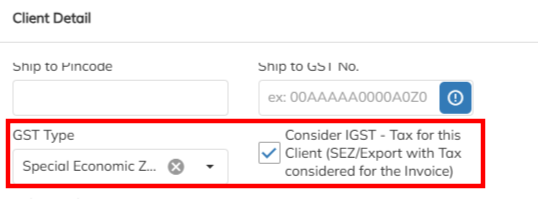
Summary of the GST Type & E-Invoice status :
| GST Type | Invoice Type | Tax Type | Percentage of Tax | E-invoice Type | GST No |
| IGST | B2B | IGST | 18% | B2B | Mandatory |
| CGST & SGST | B2B | CGST & SGST | 9% | B2B | Mandatory |
| SEZ | SEZWOP | SEZ | 0% | SEZWOP | Mandatory |
| SEZ with Tax (IGST) | SEZWP | IGST | 18% | SEZWP | Mandatory |
| Export | EXPWT | SEZ | 0% | EXPWT | Non-Mandatory |
| Export with Tax (IGST) | EXPT | IGST | 18% | EXPT | Non-Mandatory |
| Unregistered/B2C/Institution | B2C | B2C | 0% | B2C | Non-Mandatory |
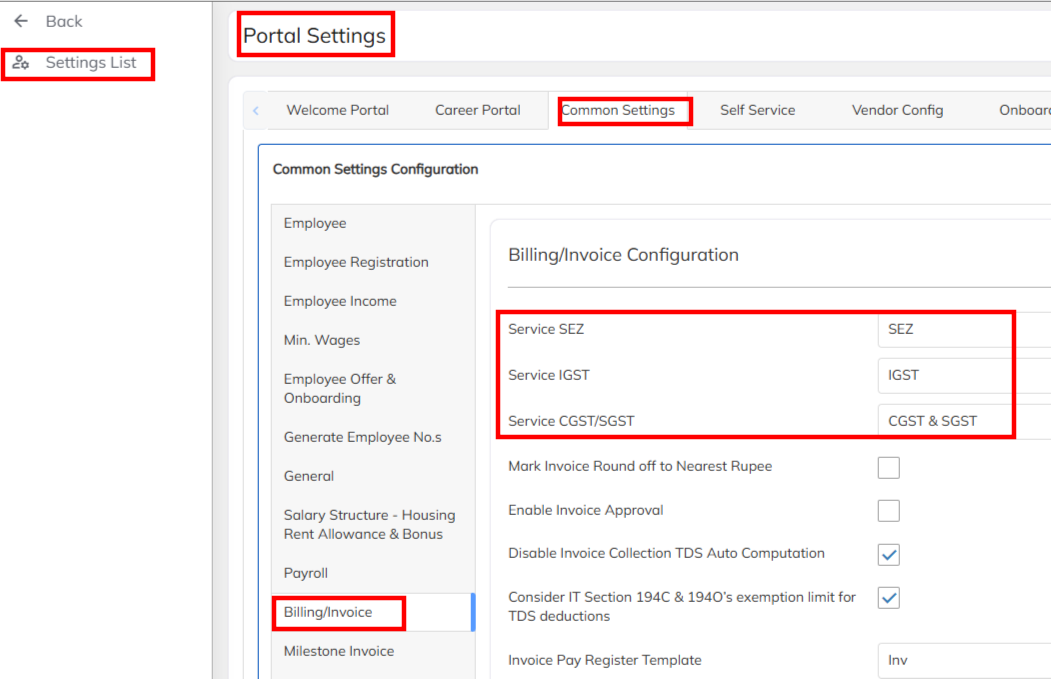
Note : During the application set up mandatory to set up the tax type under configuration level.
Navigate to setting>> Company set up >> Portal Setting >> Common settings >> Billing/ Invoice option under map the SEZ, IGST and CGST& SGST tax details.
Was this article helpful?
That’s Great!
Thank you for your feedback
Sorry! We couldn't be helpful
Thank you for your feedback
Feedback sent
We appreciate your effort and will try to fix the article