The Purchase Order (PO) Markup Item configuration is used to define markup charges that apply to a PO based on slab ranges. The PO Markup Items allows users to define and manage additional cost components or markup items associated with a Purchase Order (PO). These markup items may include admin charges, background verification (BGV) fees, consolidated billing items, or other recurring/one-time costs.
STEPS TO CONFIGURE PO -MARK-UP :
Navigate to settings >> Staffing Masters >> PO Mark-up Line Item
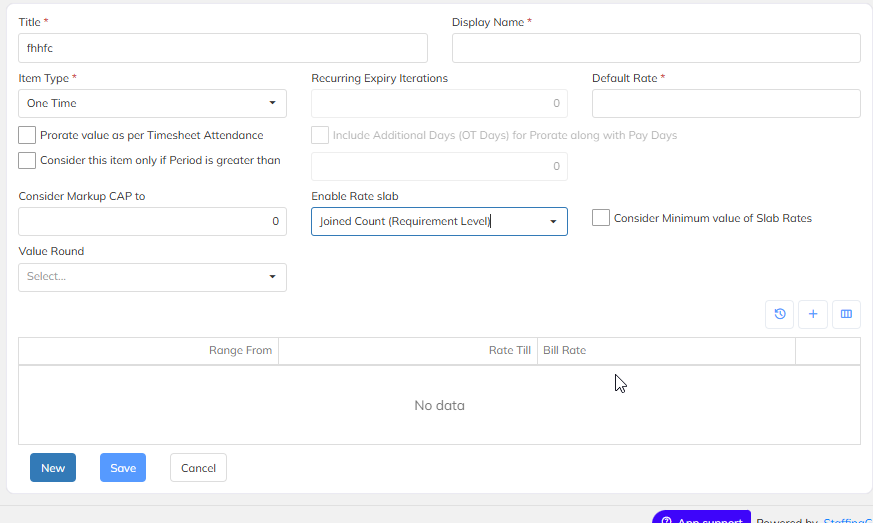
Below is the brief explanation for each item to configure in the application.
| Field Name | Description |
| Title | Internal name for identifying the markup item (Example: Service charge) |
| Display Name | which determines how the item name will appear in pay-register |
| Item Type | Defines the nature of billing. |
| 1.Recurring : Every month markup will calculate on salary header | |
| 2.One Time : Mark-up will calculate only one time | |
| 3.Recurring Expiry : Mark-up will calculate based on the Expiary months provided upto hat markup will calculate in month | |
| Default Rate | User can enter either Flat Rate or Percentage as Defaukt rate |
| Recurring Expiry Iterations | Controls how many cycles the markup should apply (0 indicates no limit). |
| Prorate value as per Timesheet Attendance | If enabled, markup calculation will be prorated based on attendance (Pay-period) |
| Consider this item only if Period is greater than | Markup applies only when the PO pay period is longer than the specified value. |
| Include Additional Days (OT Days) for Prorate along with Pay Days | Adds OT days while prorating along with pay-period |
| Consider Markup CAP to | Defines a maximum markup value to avoid exceeding contractual limits. |
| Value Round | Determines how markup calculated amounts are rounded (NA, Round Up, Round Down, etc.). |
| Enable Rate slab | Will enable the slab in the dropdown based on requirement. Below explanation provided for each line item in brief |
| Consider Minimum value of slab Rates | the system automatically applies the minimum rate defined within the applicable slab range during calculations, rather than using the average or maximum rate. This ensures that, for any given condition falling within a slab range, the lowest eligible rate value from that range is considered for billing, |
ENABLE RATE SLAB :
| Section | Description |
| Time Sheet Present Percentage | The ratio (in %) of days an employee or consultant has marked attendance in the timesheet compared to the total working days in a period. |
| Gross Salary Range | The total salary range before deductions. |
| Billable CTC Range | Markup will calculate on Based on the condition will configure , Ex: given at below snap |
| Joined Count (Requirement Level) | The number of employees or consultants who have joined under a particular project requirement or level. |
| Staffing Tenure (Days) | The total number of days a resource has been staffed on start date and end date of the employee. |
| Employment Tenure (Days) | If any employee transfers in the middle of the month, new staffing start and end dates of the employee mark‑up will calculate. |
| Attendance (Pay) Days | The number of payable working days in a month for the resource. |
| Fixed CTC | Mark‑up will calculate on Fixed CTC of the employee. |
| Fixed Basic | Mark‑up will calculate on Fixed Basic of the employee. |
| Average Man Days (Consolidated Billing) | Mark‑up will calculate on bill period of the employee (where employee belongs to Rate card Billing). |
| Payroll Count | If user processes payroll with a specific count, mark‑up will calculate based on the count in payroll transaction. |
Configuration on Billable CTC Range in Mark-up :
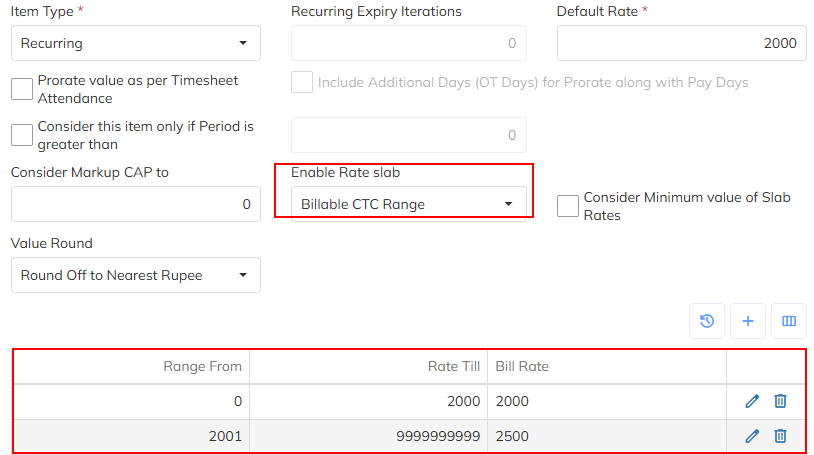
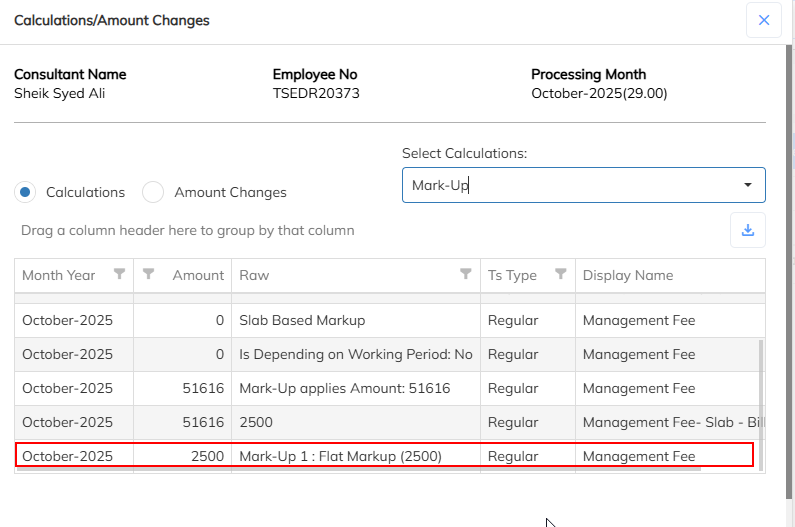
After processing payroll, Markup will calculate based on given condition
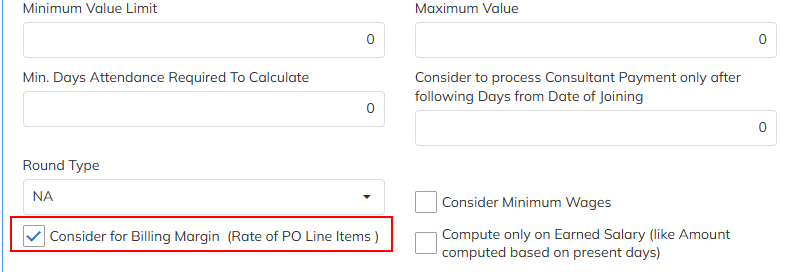
If mark-up needs to calculate for particular salary header means we need to enable the highlighted option which is shown below.
Was this article helpful?
That’s Great!
Thank you for your feedback
Sorry! We couldn't be helpful
Thank you for your feedback
Feedback sent
We appreciate your effort and will try to fix the article