Purpose
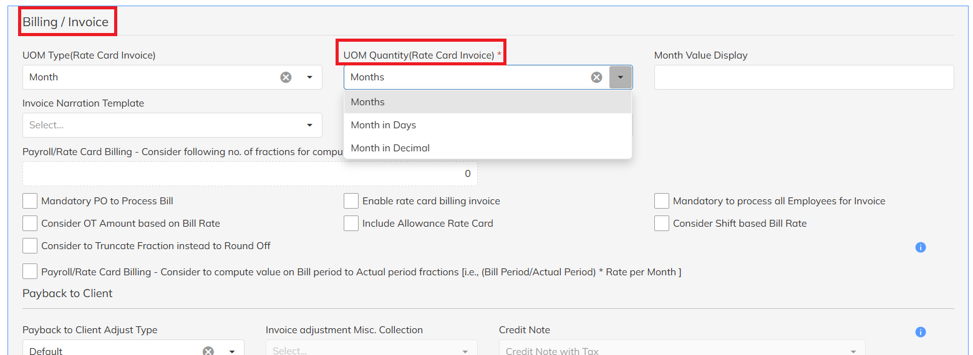
If there is a quantity mismatch in the raised invoice, verify the UOM Quantity mapped under the UOM Quantity (Rate Card Invoice configuration).
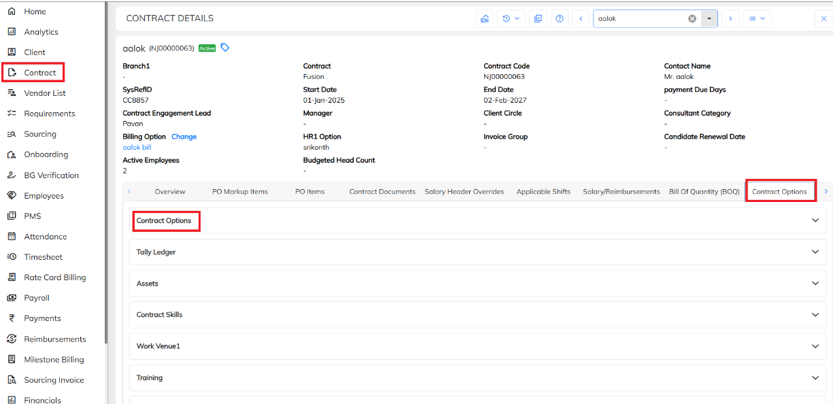
- Navigate to Contract → Select the required Contract → Click on Contract Options → Again click on Contract Options.
- Under contract options, Navigate to Billing/ Invoice, Map the correct UOM Quantity (Rate Card Invoice).
Was this article helpful?
That’s Great!
Thank you for your feedback
Sorry! We couldn't be helpful
Thank you for your feedback
Feedback sent
We appreciate your effort and will try to fix the article