Issue/Purpose: To correct the GST Type mapped to the client when the wrong tax type is reflected in the invoice.
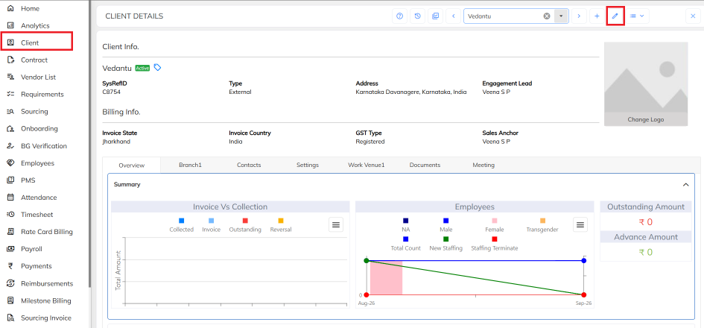
- Navigate to Clientà Select the required Client à Click on edit icon.
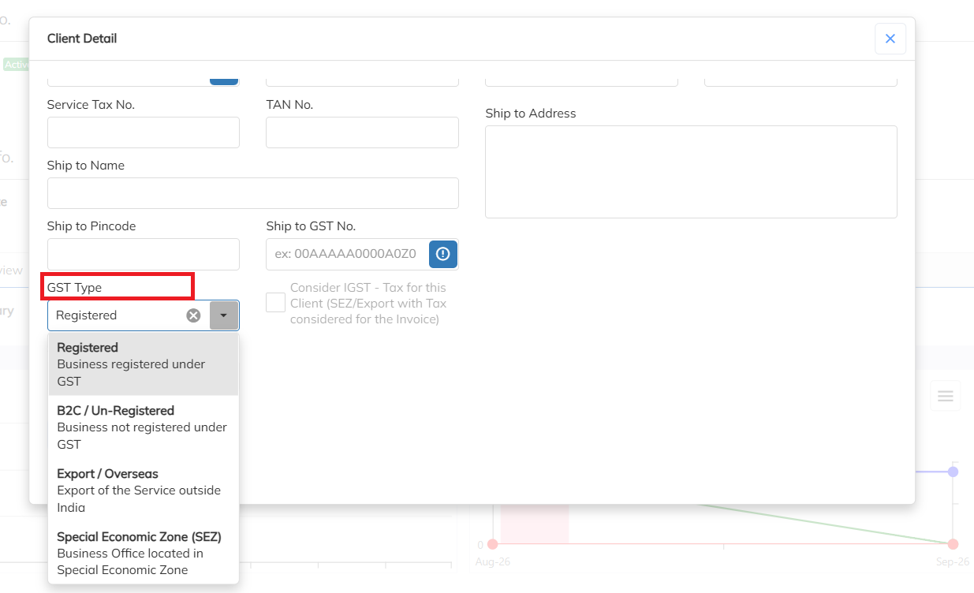
- Under GST Type, select the appropriate option based on the client’s GST registration status.
- GST Type: Select the appropriate GST type based on the client’s GST registration status, such as Registered, B2C/Un-Registered, Export/Overseas, or Special Economic Zone (SEZ).
Was this article helpful?
That’s Great!
Thank you for your feedback
Sorry! We couldn't be helpful
Thank you for your feedback
Feedback sent
We appreciate your effort and will try to fix the article