Steps to Apply Gate Pass in ESS
Step 1: Login
Login to the ESS Portal (Web or Mobile App).
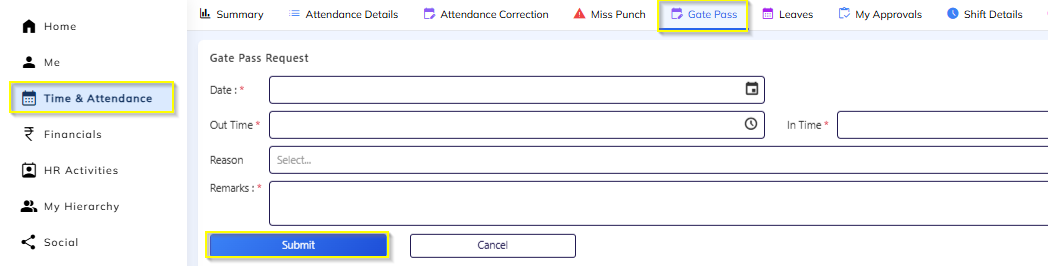
Step 2: Navigate to Gate Pass
Go to Time & Attendance
Click on Gate Pass Request
Step 3: Create New Request
Click on “+ Apply Gate Pass”
Step 4: Enter Details
Fill in the required information:
Date
Out Time
In Time
Reason / Remarks
Step 5: Submit
Click Submit
The request will be auto-routed to the Reporting Manager for approval.
After Approval
Approved gate pass hours will be:
Considered in total working hours (if configured)
Adjusted against late coming / short hours (if applicable)
Important Notes
Gate Pass can be applied for past, present, or future dates (as per configuration).
If not approved, it will not impact attendance.
Gate Pass availability may depend on company policy (daily limit(1) / monthly limit(3)).
Was this article helpful?
That’s Great!
Thank you for your feedback
Sorry! We couldn't be helpful
Thank you for your feedback
Feedback sent
We appreciate your effort and will try to fix the article