Employee Steps to Add Skills During Onboarding
Login to ESS Portal
Employee logs in using onboarding credentials.
Go to My Profile / Personal Details
Navigate to:
Home → Skills (or Profile → Professional Details → Skills).
Click on “Add Skill”
Click the “+ Add” or “Add Skill” button.
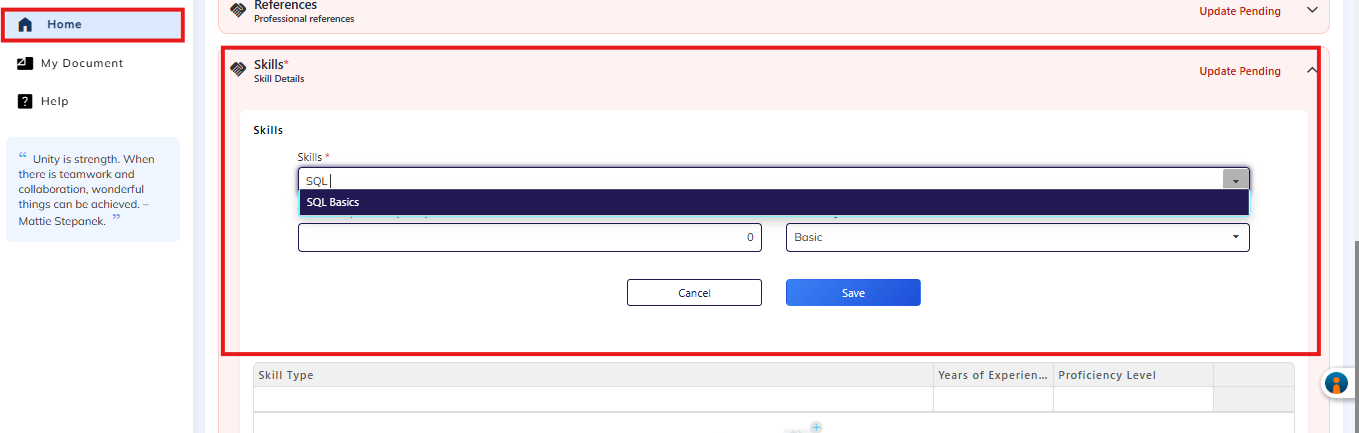
Select Skill from Dropdown
Choose the skill from the pre-defined list created by HR/Admin.
Select Skill Proficiency Level
Example:
Basic
Intermediate
Advanced
Expert
Add Experience (if applicable)
Enter number of years/months of experience.
Save & Submit
Click Save / Submit.
HR Review & Approval (if enabled)
HR/Admin reviews and approves the skills.
Typical Onboarding Flow (HRMS)
Important HR Controls (Best Practice)
As HR/Admin, you should:
Pre-create skills in Masters (employees should not create new skills).
Was this article helpful?
That’s Great!
Thank you for your feedback
Sorry! We couldn't be helpful
Thank you for your feedback
Feedback sent
We appreciate your effort and will try to fix the article