Overview
The StaffingGo application provides an in-built functionality for automatic calculation of statutory components (such as PF, ESI, PT, etc.) based on the employee’s location and gross salary. This ensures compliance with government regulations while reducing manual effort and errors.
Navigation Path
To access this functionality:
Login to StaffingGo Application.
Go to Compliance Module.
Navigate to Statutory Master section.
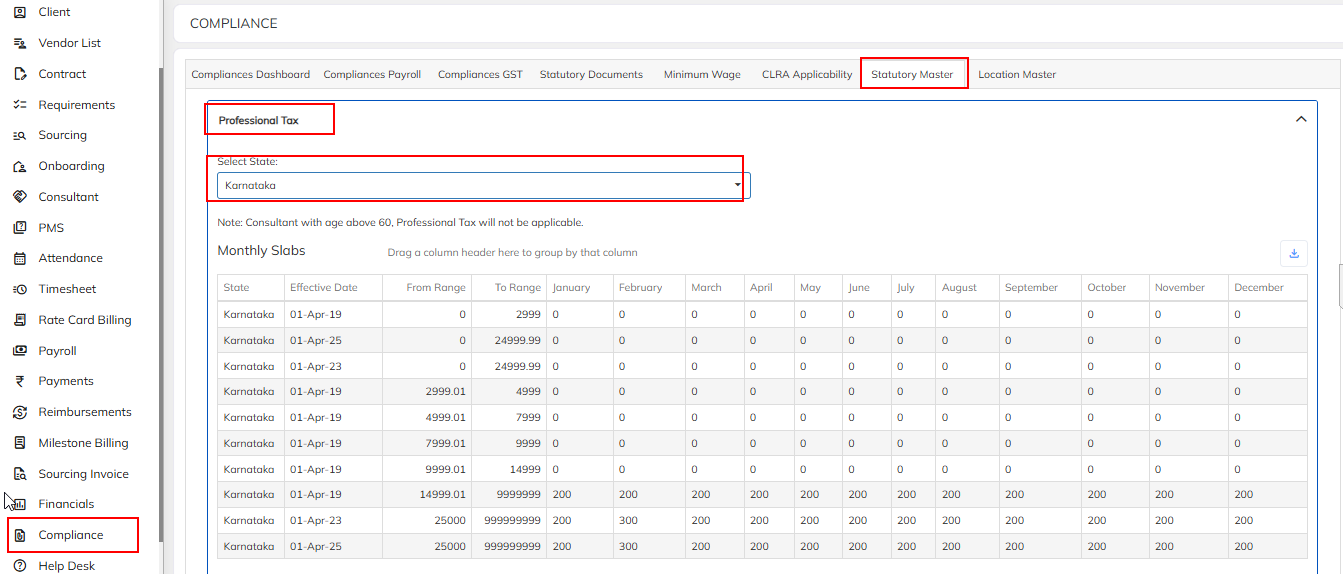
Under Statutory Part, select the statutory component and verify the Statutory components based on Gross amount and location. Attaching the snap below on Statutory Components.
1.PROFESSIONAL TAX :
Professional Tax (PT) is a statutory tax levied by state governments on salaried employees, professionals, and businesses. The amount of PT depends on the employee’s gross monthly salary and the state-specific slab rates.
States with Monthly PT Slabs :
Professional Tax is calculated based on salary slabs defined by each state. Below are examples of commonly followed slabs:
Karnataka
Salary up to ₹14,999 → Nil
Salary ₹15,000 & above → ₹200 per month
Half-Yearly Professional Tax:
In some states (like Tamil Nadu, Kerala, and Puducherry), Professional Tax (PT) is not calculated on a monthly salary basis, but rather on an employee’s average income for six months.
The year is divided into two half-yearly periods:
April to September
October to March
The PT liability is then decided based on the salary/income that falls into the prescribed half-yearly slab.
States Following Half-Yearly Slabs
Tamil Nadu
Kerala
Puducherry
How It Works
The system automatically maps the statutory rules based on the location where the employee is deployed.
Each location has different statutory values (for example, professional tax slab varies state-wise).
Based on the employee’s Gross Salary, the application will determine the eligible statutory deductions.
Example
Suppose an employee is based in Bengaluru (Karnataka) with a gross salary of ₹25,000.
The system will automatically apply the Professional Tax slab for Karnataka and calculate the deduction.
It will also check for PF/ESI applicability based on gross salary thresholds.
If another employee is in Mumbai (Maharashtra) with the same salary,
The Professional Tax value will differ since the PT slab in Maharashtra is different from Karnataka.
2. LWF:
The Labour Welfare Fund (LWF) is a statutory contribution collected by the state government from employees and employers. It is used to provide welfare measures for workers, including education, healthcare, recreation, and other social benefits.
Applicable only in certain states (e.g., Maharashtra, Karnataka, Tamil Nadu, Gujarat, Kerala, etc.).
Both employers and employees may contribute, depending on state-specific rules.
The contribution is usually nominal, often a fixed monthly or yearly amount.
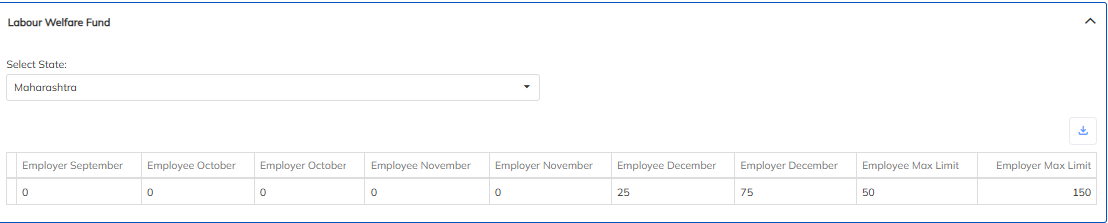
How LWF Works
Employer calculates the LWF contribution based on employee salary and applicable state slab.
Employee’s portion is deducted from the monthly salary.
Example – Maharashtra
Employee contribution: ₹10 per month (for salary ≤ ₹15,000), ₹20 per month (for salary > ₹15,000).
Employer contribution: ₹20 per month.
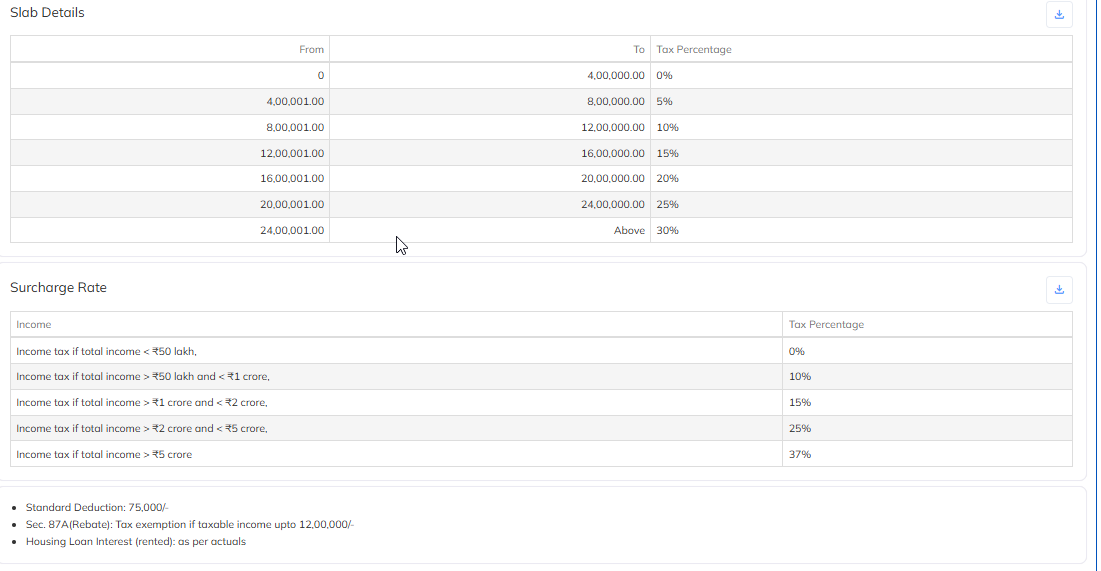
3. INCOME TAX:
Income Tax (IT) is a statutory deduction under the Income Tax Act, 1961. Employers deduct TDS (Tax Deducted at Source) from employee salaries based on taxable income, applicable slabs, exemptions, and deductions.
Deduction is monthly, remitted to the Government of India.
Employees can choose between Old Regime (with exemptions & deductions) or New Regime (lower rates, no most exemptions/deductions).
StaffingGo calculates IT automatically based on selected regime.
How IT Deduction Works in StaffingGo
Employee Gross Salary: Based on monthly salary, allowances, bonuses, etc.
Choose Tax Regime: Old or New.
Exemptions/Deductions: Applied automatically if Old Regime is selected.
Taxable Income = Gross Salary – Exemptions – Deductions (Old Regime)
Monthly TDS Calculation = Annual Tax ÷ 12
Example:
Annual Gross Salary = ₹12,00,000
Old Regime Taxable Income = ₹10,00,000 → Tax = ₹87,500 → Monthly TDS ≈ ₹7,292
New Regime Taxable Income = ₹12,00,000 → Tax = ₹92,500 → Monthly TDS ≈ ₹7,708
4. ESI:
Employee State Insurance (ESI) is a social security scheme under the Employee State Insurance Act, 1948, aimed at providing medical, sickness, maternity, disability, and dependent benefits to employees.
Applicable to employees earning ₹21,000 or less per month (as per the latest wage limit).
Eligibility Check: System verifies if employee’s gross salary ≤ ₹21,000.
Automatic Calculation:
Employee share = 0.75% of gross salary
Employer share = 3.25% of gross salary
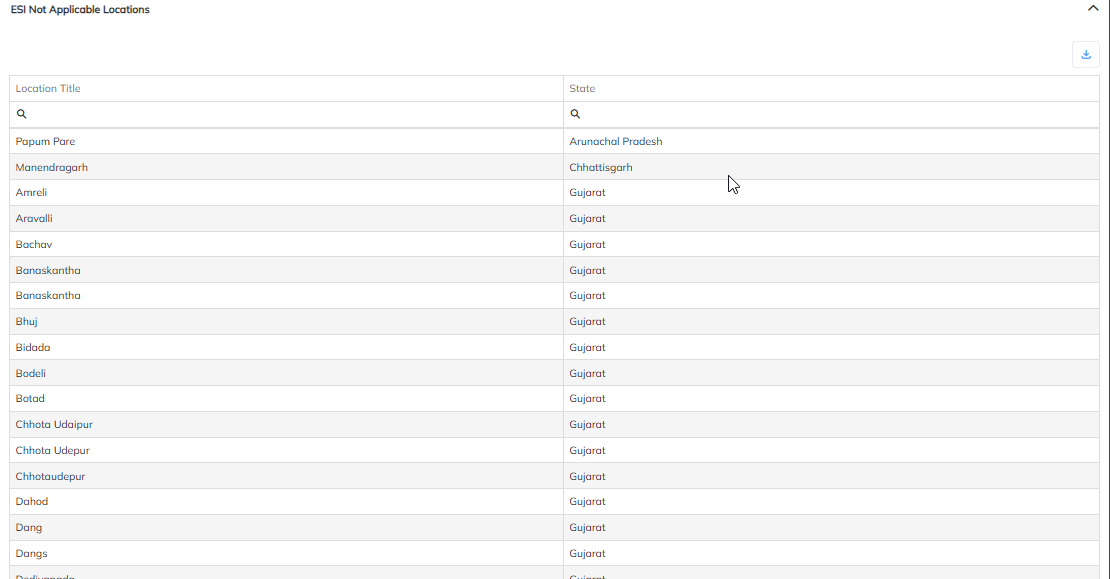
In application, we will show ESI not applicable locations.
Was this article helpful?
That’s Great!
Thank you for your feedback
Sorry! We couldn't be helpful
Thank you for your feedback
Feedback sent
We appreciate your effort and will try to fix the article