Purpose
The Attendance Regularization Limit cannot be configured with a future effective date. Any changes made to the Attendance Strike Rules will take effect immediately.
Example:
If the current limit is 5 and you want to change it to 3 from 01-Aug-2026, do not update the configuration before the July payroll is completed. Make the change only on or after 01-Aug-2026.
Steps to Update the Attendance Regularization Limit
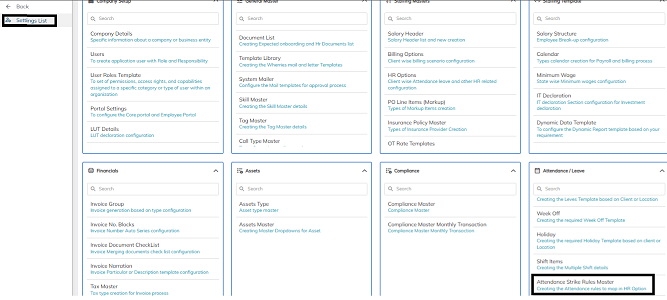
Step 1: Navigate to Attendance Strike Rules Master
Go to:
Settings List → Attendance/Leave → Attendance Strike Rules Master
Step 2: Open the Attendance Strike Rule
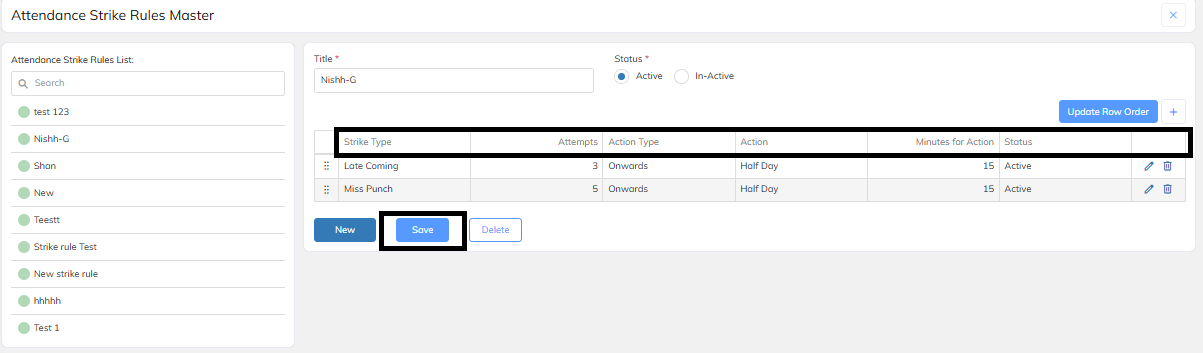
- Select the required Attendance Strike Rule.
- Click the Edit (✏️) icon.
Step 3: Update the Limit
- In the Attempts field, change the value from 5 to 3.
- Click Save.
Important Note
- Changes to the Attendance Regularization limit are effective immediately after saving.
- Future effective dates are not supported.
- To avoid impacting the current payroll period, update the limit only after the July payroll process is completed.
- From 01-Aug-2026, you can change the limit from 5 to 3 by following the above steps.
Expected Result
After saving the changes, employees will be allowed to submit Attendance Regularization requests only up to the newly configured limit (3 attempts).
Was this article helpful?
That’s Great!
Thank you for your feedback
Sorry! We couldn't be helpful
Thank you for your feedback
Feedback sent
We appreciate your effort and will try to fix the article