Navigation Path:
Configuration Steps:
Step 1:
Go to Settings → Declaration → Resignation template
Step 2:
Click on “+ Add” to create a new Exit Interview Question.
Step 3:
Enter the Question Type:
If Question Type is Text then Open Text (employee can type freely)
If Question Type is Yes/No then an employee response is mandatory They must select either Yes or No.
Rating Scale (1–5, Strongly Disagree → Strongly Agree)

Step 4:
Add the Question Text.
(Example: “What prompted you to look for another job?”)
Step 5:
Choose if the attachment is Mandatory or Optional.
Step 6:
Create the questions in Order so questions appear in the desired sequence.
Step 7:
Save the setup. The question will now appear during the Exit Interview process for employees.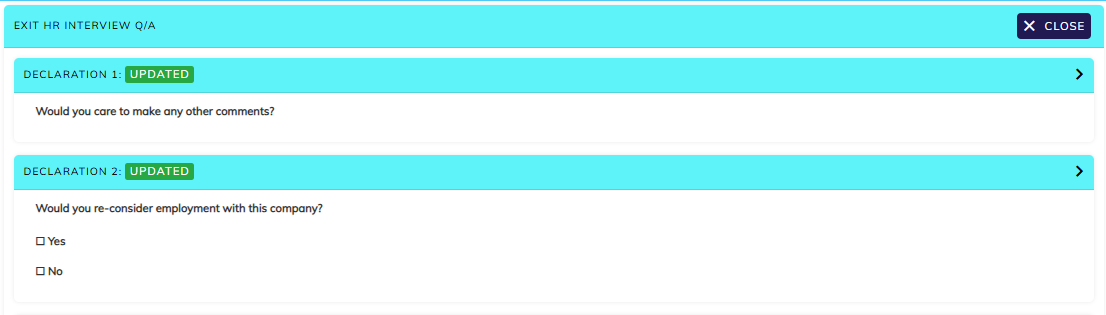
Sample Exit Interview Question Bank (for Configuration)
What prompted you to start looking for another job? (Open Text)
What did you like most about your role and the organization? (Open Text)
What challenges did you face in your role? (Open Text)
How satisfied were you with your manager’s support? (Rating Scale 1–5)
Were you given enough training and resources to do your job effectively? (Rating Scale 1–5)
How satisfied were you with communication within the company? (Rating Scale 1–5)
Would you consider rejoining the company in the future? (Yes/No)
Any suggestions for improving the employee experience? (Open Text)
Once the Resignation template is configured same can be mapped under HR options:
Staffing masters → HR option → Resignation
Was this article helpful?
That’s Great!
Thank you for your feedback
Sorry! We couldn't be helpful
Thank you for your feedback
Feedback sent
We appreciate your effort and will try to fix the article