To enable the Timesheet module in ESS without requiring Attendance Punch, please ensure that the following configurations are completed:
1. Billing Options
Navigate to Billing Option and configure:
- Timesheet Input Type → Select "Self Service/Bio-Matrix"

2. HR Options → Under the HR option, the following sub-options are required to be checked
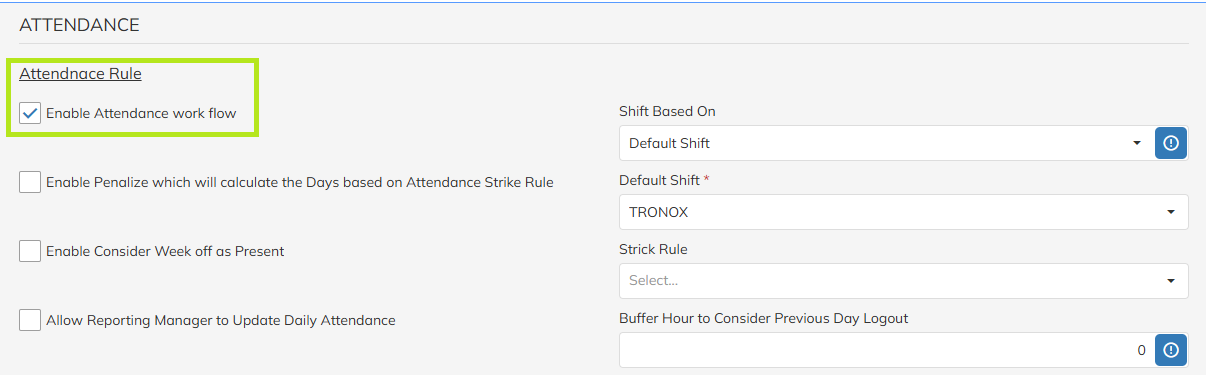
i.) Attendance → Attendance Rule and ensure:
- Enable Attendance Workflow → Enabled (Tick Marked)
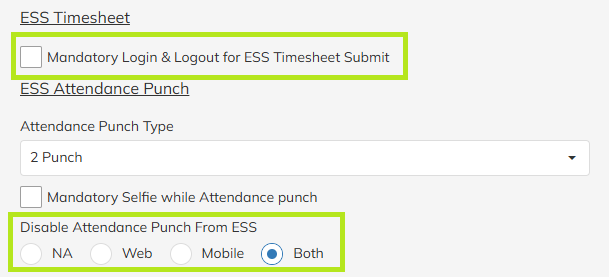
ii.) ESS Timesheet
- Mandatory Login & Logout for ESS Timesheet Submit → Disabled
Note: - If this option is enabled, employees will be required to enter Login and Logout times while submitting timesheets. Failure to provide these details may result in the attendance status being marked as "Absent."
- If this option is disabled employee can be marked as "Present" without Login and Logout timings.
iii.) ESS Attendance Punch
- Disable Attendance Punch from ESS → Select "Both"
This setting should be used when Punch In and Punch Out entries are not required from employees.
iv.) Timesheet
- Enable Timesheet Approval→ Enabled (Tick Marked)
Makes timesheet approval mandatory after submission. - Allow to Update Past Attendance While Timesheet Submit→ Enabled (Tick Marked)
Allows users to submit attendance/timesheets for past dates. - Allow to Update Future Date Attendance While Timesheet Submit→ Enabled (Tick Marked)
Allows users to submit attendance/timesheets for future dates.
All three options listed above must be enabled for proper Timesheet functionality.
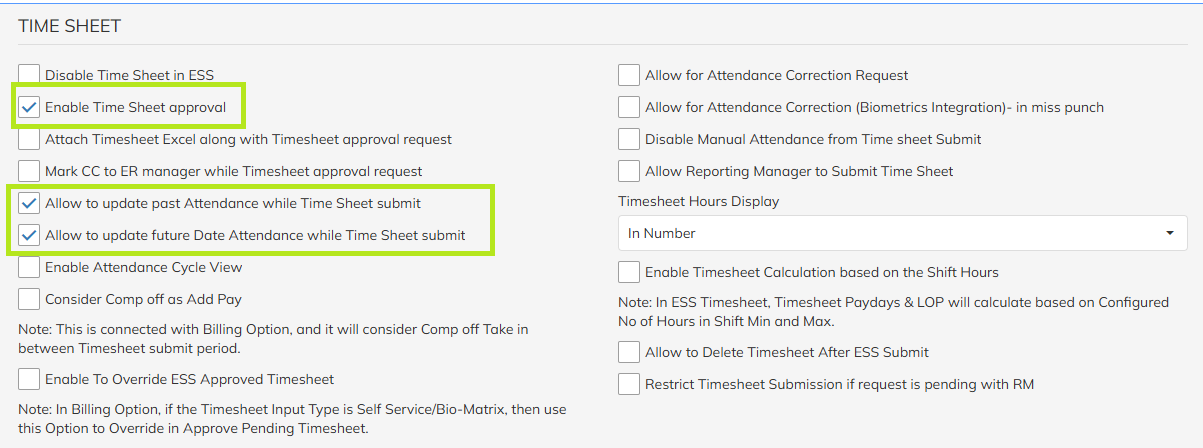
Note: The following configurations are mandatory for 'Enabling the Timesheet Module in ESS without Attendance Punch'.
All other options can be enabled or disabled as per requirement.
Was this article helpful?
That’s Great!
Thank you for your feedback
Sorry! We couldn't be helpful
Thank you for your feedback
Feedback sent
We appreciate your effort and will try to fix the article