IT Investment Configuration is an activity available in the application and must be followed for every financial year. The IT Investment section includes all investment categories applicable under TDS. The application also provides the option to configure additional customized investment details, while the remaining sections are maintained as per the organization’s standard policies.
Follow the below mentioned steps to configure in the application.
1. Navigate to Settings >>Staffing Templates >> choose the IT Declaration option.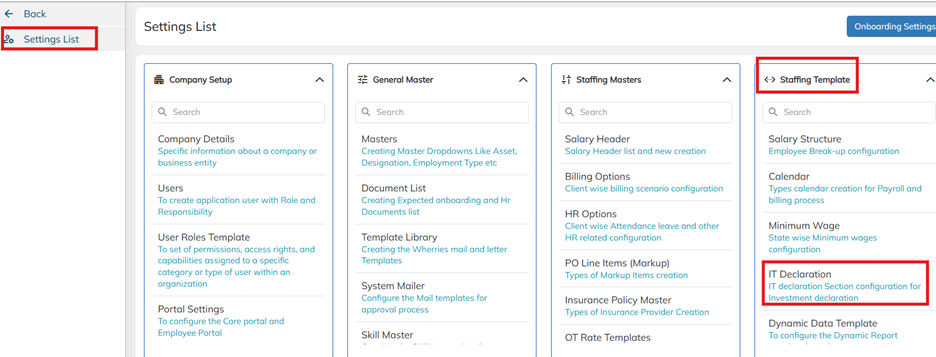
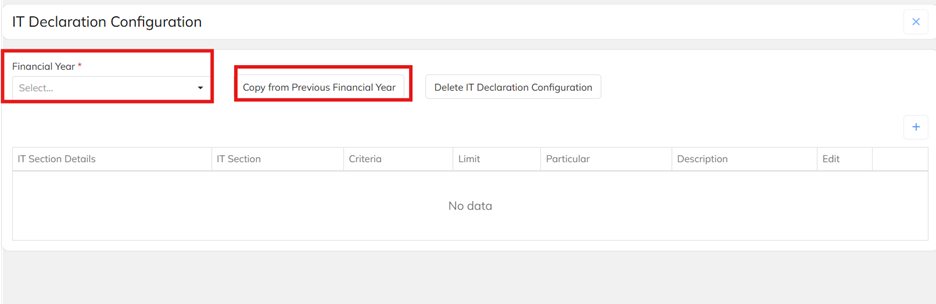
2. Navigate to IT declaration and choose the financial year and use the option Copy from the previous financial year. This activity is mandatory on every financial year. If any additional section details need to add in the application use the + symbol to allocate.
3. If any modification in the IT section use the edit option ad use the delete option if any section not applicable in the organization.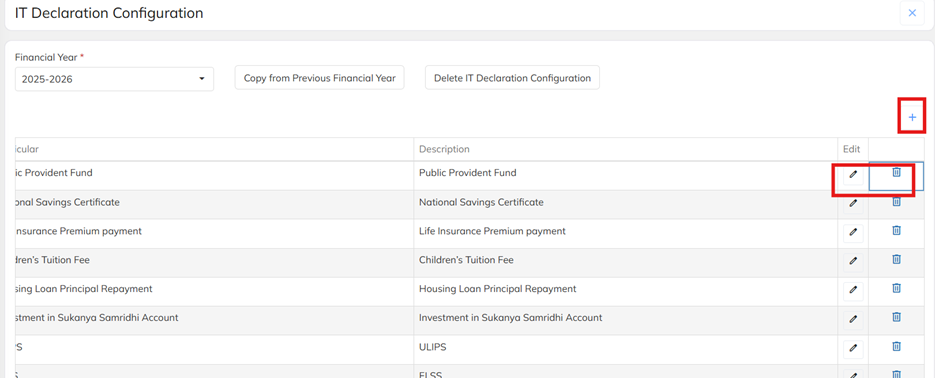
Was this article helpful?
That’s Great!
Thank you for your feedback
Sorry! We couldn't be helpful
Thank you for your feedback
Feedback sent
We appreciate your effort and will try to fix the article