When is syncing required?
Syncing of declarations is required when:
Newly added declaration types are not reflecting for an employee.
Declaration structure has been updated at client level.
Missing declaration records need to be aligned with current configuration.
Employee declarations are not appearing correctly in the Documents section.
Below are the steps one can Sync the Declarations at Employee level
- Click on Employee
- Filter out the respective Employee
- Click on Documents
- Selecting the Declaration Type which need to be Synced

- Click on Sync Missing Declarations
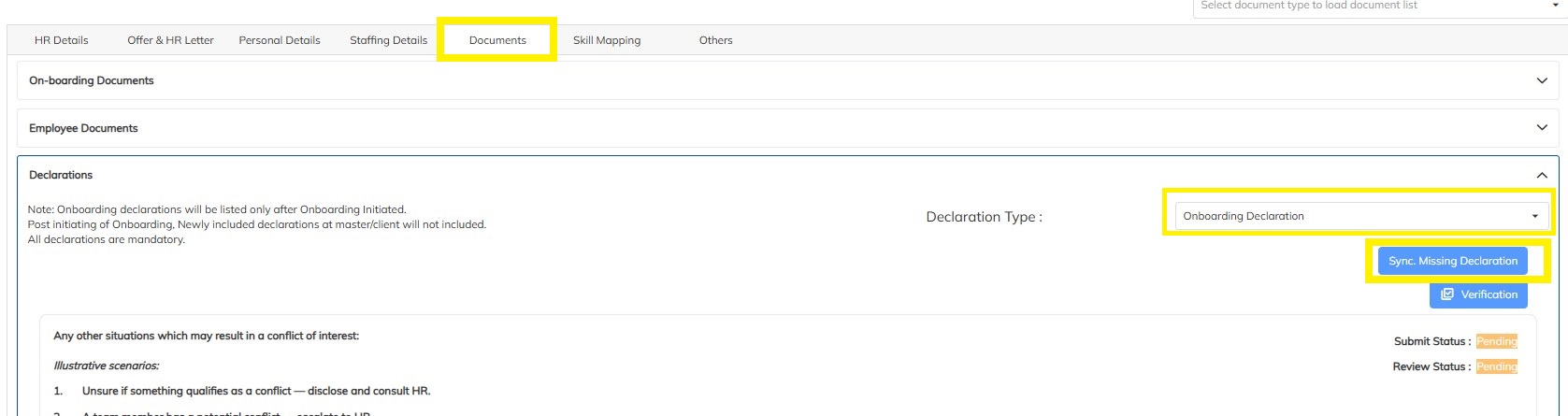
- Click on Yes option when Field regarding Sync Missing Declaration Appears
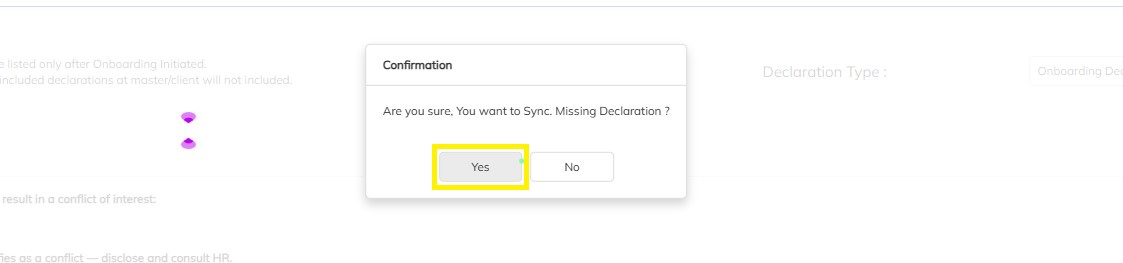
- Then Refresh the page and verify if the declarations have been synced
Need Help?
If you have any doubts or need further assistance regarding client creation or any other feature, feel free to reach out to our support team at support@staffinggo.in. We’re here to help you!
Was this article helpful?
That’s Great!
Thank you for your feedback
Sorry! We couldn't be helpful
Thank you for your feedback
Feedback sent
We appreciate your effort and will try to fix the article