Mapping Contract SPOC in the Invoice Template
Mapping the Contract SPOC (Single Point of Contact) in the invoice template ensures that the correct client contact name is automatically reflected on invoices. This avoids manual edits, reduces errors, and keeps client communication consistent whenever invoices are generated.
Follow the steps below to configure this correctly:
Step 1: Update the Contract SPOC in the Client Setup
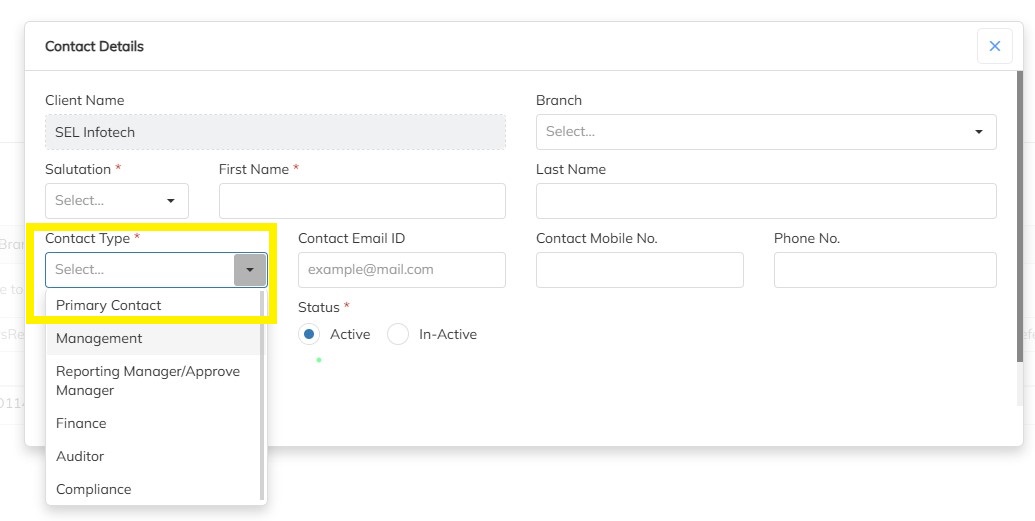
Click on the respective Client.
Navigate to Contacts.
Create the required contact.
Map the Contact Type as Primary Contact.
Click Save.
This ensures the correct SPOC is associated with the client.
Step 2: Map the Contact Tag in the Invoice Template
Open the existing / already created Invoice Template.
Insert the tag
{{ContactName}}at the required location in the templateThis tag dynamically pulls the contact name mapped to the client.

Upload the updated invoice template.
Save the changes.
Result
Once configured, the invoice will automatically display the relevant contact name for each client based on the mapped SPOC—no manual intervention required.
Need Help?
If you have any doubts or need further assistance regarding client creation or any other feature, feel free to reach out to our support team at support@staffinggo.in. We’re here to help you!
Was this article helpful?
That’s Great!
Thank you for your feedback
Sorry! We couldn't be helpful
Thank you for your feedback
Feedback sent
We appreciate your effort and will try to fix the article