Purpose
This manual explains why the error message appears while creating a Credit Note and how to avoid it.
Error Message
“Credit Note amount should not exceed the Outstanding amount (87763.30)”
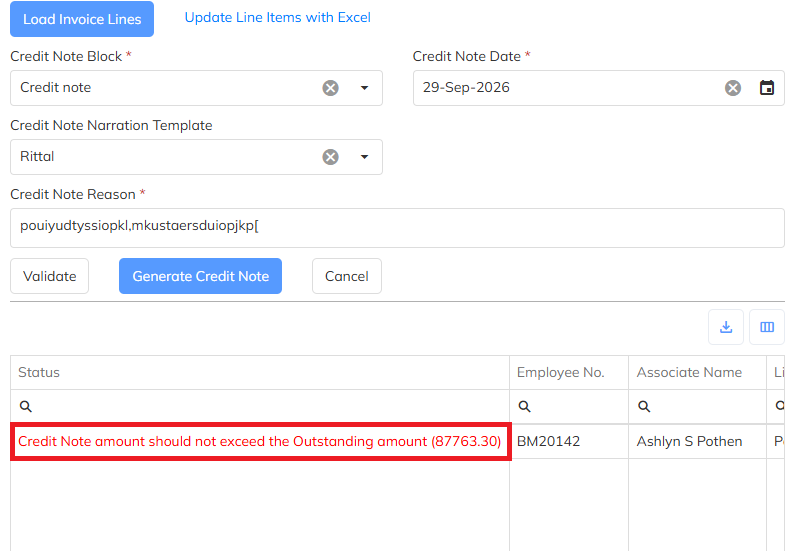
Why This Error Comes
This error comes when the total Credit Note amount is more than the Outstanding Amount.
Example:
Outstanding Amount: ₹87,763.30
Collection Amount: ₹10,000
Bill Amount: ₹82,850.25
The total amount is:
₹10,000 + ₹82,850.25 = ₹92,850.25
The total amount ₹92,850.25 is greater than the Outstanding Amount ₹87,763.30.
So, the system shows the error:
“Credit Note amount should not exceed the Outstanding amount (87763.30)”
How to Resolve
Check the Outstanding Amount.
Check the Collection Amount.
Check the Bill Amount.
Calculate the total amount.
Make sure the total Credit Note amount is not greater than the Outstanding Amount.
Correct the amount and create the Credit Note again.
Important
The Credit Note Amount should be equal to or less than the Outstanding Amount.
Example:
Outstanding Amount = ₹87,763.30
Credit Note Amount should be ₹87,763.30 or less.
Expected Result
Once the Credit Note amount is within the Outstanding Amount, the system will allow you to create the Credit Note successfully.
Was this article helpful?
That’s Great!
Thank you for your feedback
Sorry! We couldn't be helpful
Thank you for your feedback
Feedback sent
We appreciate your effort and will try to fix the article