1. Purpose
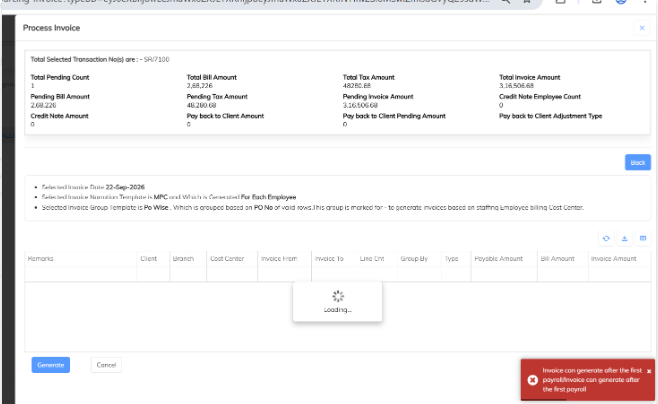
This configuration is used when the system displays the error “Invoice can generate after the first payroll.”
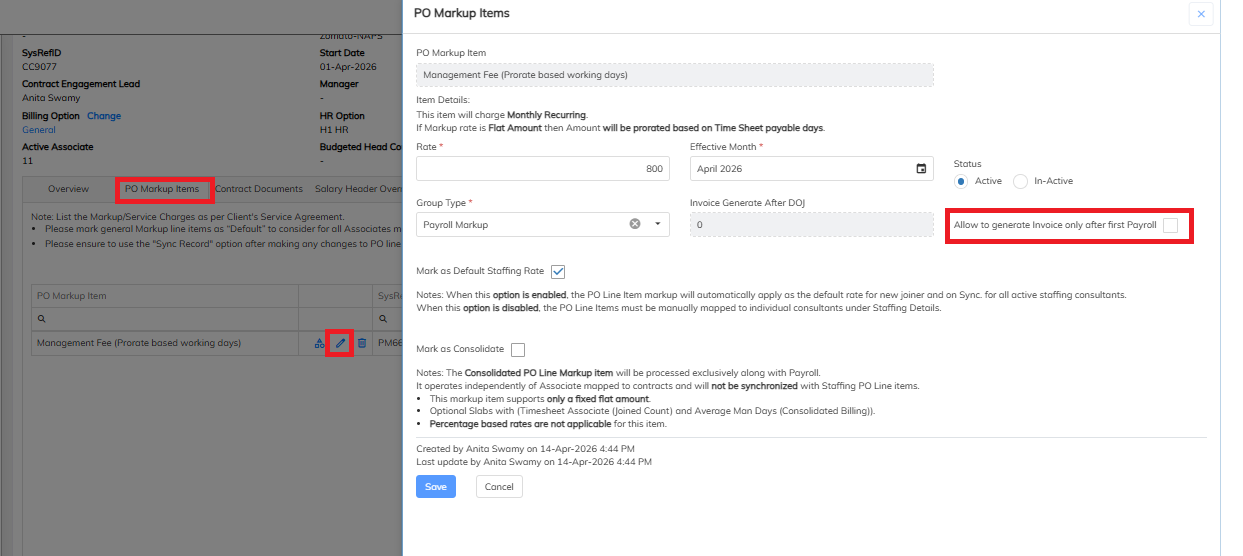
To resolve this error, the Allow to Generate Invoice Only After First Payroll option must be configured at the Contract Level under the PO Markup Item.
2. Configuration Steps
Follow the steps below to configure the option:
Navigate to the Contract Module.
Open the required Contract.
Go to the PO Markup Item section.
Locate the option “Allow to Generate Invoice Only After First Payroll.”
Enable the option if the invoice should be generated only after the employee's first payroll is processed.
Save the configuration.
3. Expected Result
After the first payroll is processed, the system will allow the invoice to be generated without displaying the error:
“Invoice can generate after the first payroll.”
4. Important Note
This configuration is available at the Contract Level → PO Markup Item.
If Allow to Generate Invoice Only After First Payroll is enabled, the invoice cannot be generated before the first payroll is processed.
If the business requirement is to generate invoices without waiting for the first payroll, verify whether this option should be disabled.
Was this article helpful?
That’s Great!
Thank you for your feedback
Sorry! We couldn't be helpful
Thank you for your feedback
Feedback sent
We appreciate your effort and will try to fix the article