Purpose
The purpose of this SOP is to explain the process for refreshing the Purchase Order (PO) in the system after mapping the PO to an employee. The PO Refresh functionality ensures that the latest PO details are updated and reflected correctly in payroll and rate card processing.
Pre-Requisites
Before using the PO Refresh functionality, ensure the following:
A Purchase Order (PO) has been created in the system.
The PO is mapped to the respective employee.
Payroll or Rate Card processing has been completed depending on the module where the refresh is required.
User has appropriate access rights to the Payroll & Financial Module or Rate Card Module.
PO Refresh in Payroll
Location of Functionality
The PO Refresh option is available after the Payroll process is completed.
Steps to Perform PO Refresh
Navigate to Payroll Module.
Complete the Payroll Process for the required period.
Open the employee line item details.
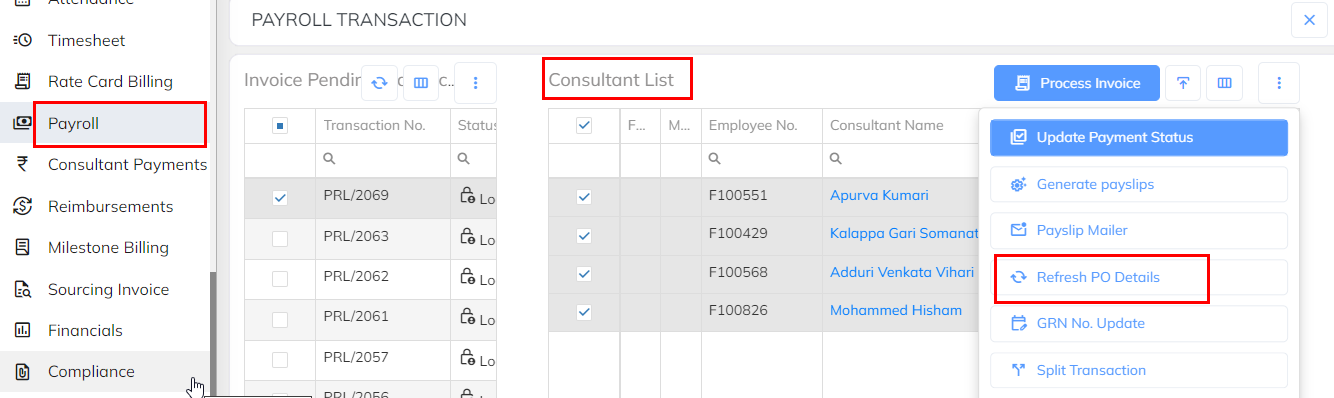
Locate the PO Refresh option under the employee line item.
Click PO Refresh to update the PO details.
Applicable Status
The PO Refresh option is available when the payroll is in:
Lock Pending Status
Locked Status
Reference Screenshot
PO Refresh in Rate Card Module
Location of Functionality
The PO Refresh option is available after Rate Card Timesheet processing.
Steps to Perform PO Refresh
Navigate to Rate Card Module.
Process the Rate Card Timesheet.
Open the relevant employee record.
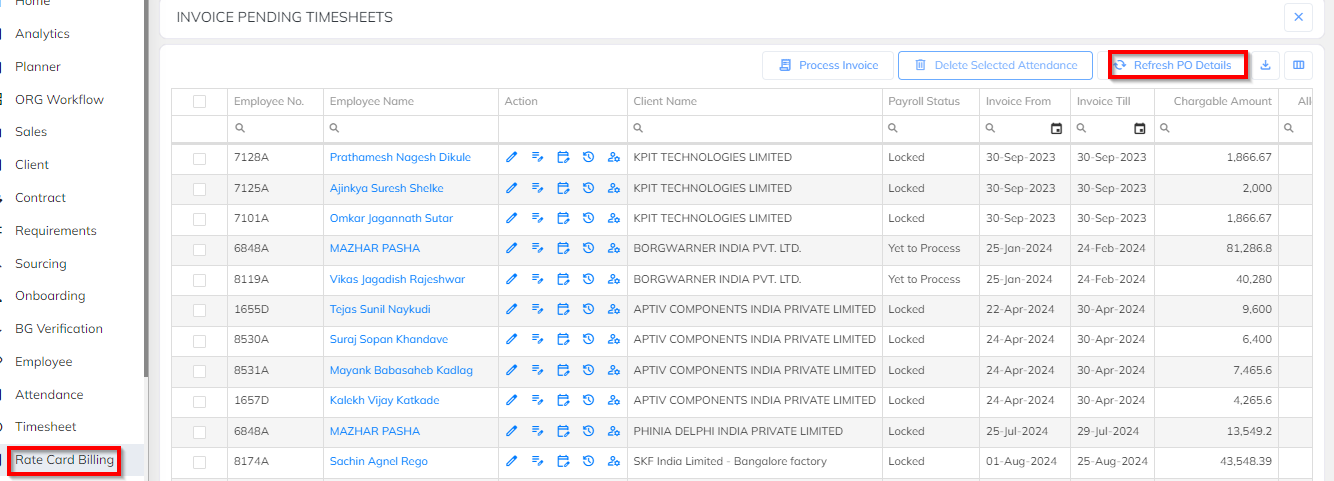
Locate the PO Refresh option.
Click PO Refresh to update the PO details in the rate card.
Important Notes
Ensure the PO is properly mapped to the employee before performing the refresh.
PO Refresh should be executed whenever new PO details are updated or modified.
If the PO details are not updated after refresh, verify the PO mapping and configuration.
Was this article helpful?
That’s Great!
Thank you for your feedback
Sorry! We couldn't be helpful
Thank you for your feedback
Feedback sent
We appreciate your effort and will try to fix the article